Common SEO Mistakes Small Businesses Make and How to Fix Each One

In this article
- What are the most common SEO mistakes small businesses make?
- Why is targeting the wrong keywords such a costly SEO mistake?
- Why does putting every service on one page hurt your rankings?
- What title tag and meta description mistakes cost you clicks?
- Is thin, copied or AI-generated content an SEO mistake?
- Which technical SEO mistakes stop Google from indexing your pages?
- How do slow and clumsy mobile pages hurt SEO?
- What local SEO mistakes keep small businesses out of the map pack?
- Which link building mistakes can get a small business site penalised?
- Why is tracking rankings instead of leads a hidden SEO mistake?
- What does fixing common SEO mistakes look like on a real small business site?
- How can you audit your own site for SEO mistakes this week?
- What is a realistic 30, 60 and 90 day plan to fix SEO mistakes?
- Want a second pair of eyes on your SEO?
You check Search Console on a Sunday night. Your site has been live for a year, you paid good money for it, and Google shows you on page five for the one service that pays your bills. A competitor with an uglier website sits at the top. It feels unfair, and it feels like something is broken that nobody explained to you.
Usually something is broken, and it is rarely one big thing. The most common SEO mistakes small businesses make are quiet ones: a homepage trying to rank for twelve services, title tags that just say "Home", a redesign that deleted the pages Google trusted, a Business Profile in the wrong category, and reports that track rankings instead of phone calls. Each one costs a little. Together they keep a good business invisible.
This guide walks through the mistakes we see most often when we audit small business sites for US and Canadian brands, why each one hurts, exactly where to check for it, and how to fix it in plain steps. If you want the full picture of how SEO works first, start with our complete guide to SEO for small business websites, then come back here to clean up what is holding you back.
What are the most common SEO mistakes small businesses make?
The most common SEO mistakes small businesses make are targeting keywords nobody searches or nobody can win, cramming every service onto one page, weak title tags, thin or copied content, technical blocks that stop indexing, slow mobile pages, a neglected Google Business Profile, risky link buying, and measuring rankings instead of enquiries.
Not every mistake is equally expensive. Some block your site from Google completely, while others just leave clicks on the table. The table below ranks the mistakes in this guide by how much damage they usually do and how fast they are to fix, so you know where to start.
| Mistake | Typical damage | Time to fix | Where to check |
|---|---|---|---|
| A noindex tag or robots.txt block left on live pages | Severe: pages cannot rank at all | Under an hour | Search Console, Page indexing report |
| Redesign or migration without redirects | Severe: years of rankings lost | One to three days | Old sitemap vs new URLs, 404 report |
| Thin, copied or mass-produced content | High: whole site can be demoted | Weeks | Your own pages vs top results |
| One page for every service | High: no page is relevant enough | One to two weeks | Your navigation and URL list |
| Wrong or no keywords | High: traffic that never buys | A few days of research | Search Console, Queries tab |
| Weak title tags and meta descriptions | Medium: impressions without clicks | A day | Search Console CTR by page |
| Neglected Google Business Profile | High for local businesses | A few hours, then ongoing | Business Profile dashboard |
| Slow, clumsy mobile pages | Medium | Days to weeks | Core Web Vitals report, PageSpeed Insights |
| Buying links or spammy directories | High risk of manual action | Ongoing cleanup | Search Console, Manual actions |
| Tracking rankings instead of leads | Hidden: you optimise the wrong thing | A day of setup | GA4 key events, call tracking |
Why is targeting the wrong keywords such a costly SEO mistake?
Targeting the wrong keywords is costly because every later step, from page copy to links, builds on that choice. Small businesses often chase broad terms like "marketing agency" or "dentist" that big brands own, or use their own internal jargon that customers never type. Both paths produce months of work with no enquiries.
There are three versions of this mistake, and most sites have at least one.
Chasing head terms you cannot win yet
A two-year-old landscaping site with twenty backlinks will not outrank national directories for "landscaping". It can rank for "paver patio installation in Plano" or "drought tolerant front yard ideas Texas", because fewer strong pages compete for them and the searcher is closer to buying. Search the phrase yourself in a private window. If page one is all Yelp, Angi, HomeAdvisor and national chains, that keyword is a later goal, not a starting point.
Using your words instead of your customers' words
A med spa calls it "neuromodulator treatment"; patients search "Botox near me". A software firm says "workflow orchestration"; buyers search "automate invoice approvals". Open Search Console, go to Performance, then the Queries tab, and read the actual words people used when your site appeared. Those phrases belong in your headings and page copy.
Ignoring intent
Someone searching "how to fix a leaking faucet" wants instructions, not a service page. Someone searching "emergency plumber open now" wants a phone number. Before you target a keyword, look at what already ranks. If page one is all how-to articles, a sales page will struggle. If page one is all service pages and maps, a blog post will struggle. Match the format Google is already rewarding.
How to fix it: list your five most profitable services, then for each one write down three to five specific phrases a ready-to-buy customer would type, including your city or region where it applies. Check each phrase in a private search, keep the ones where you see small businesses on page one, and assign one main phrase to one page.
Why does putting every service on one page hurt your rankings?
Putting every service on one page hurts rankings because Google ranks pages, not businesses. A single "Services" page that lists roofing, gutters, siding and windows in two lines each is not the most useful result for any of those searches, so it ranks for none of them. Each money service needs its own focused page.
This is one of the most common SEO mistakes we find on small business sites built from templates. The homepage says everything, the services page lists everything, and there is nothing deep enough to rank.
What a dedicated service page needs
- A clear H1 with the service and, if local, the main area you serve, for example "Gutter Installation in Columbus, Ohio".
- An opening paragraph that says who it is for, what is included and how to book.
- Details a real customer asks about: materials, timelines, price ranges or what affects price, warranties, and what happens on the day.
- Proof: photos of your own work, short project descriptions, reviews that mention this service.
- Answers to the five or six questions you hear on every sales call.
- A visible call to action and phone number, repeated after the main sections.
The opposite mistake: keyword cannibalisation
Some owners overcorrect and write six blog posts all targeting "best time to replace a roof". Google then has several similar pages and may rotate between them, and none builds strength. In Search Console, filter Performance by one query and click the Pages tab. If three or four of your URLs share the impressions, pick the strongest one, merge the useful parts of the others into it, and 301 redirect the weaker URLs to it.
What title tag and meta description mistakes cost you clicks?
The title tag and meta description mistakes that cost clicks are generic titles like "Home" or "Services", titles stuffed with keywords, the same description on every page, and descriptions that say nothing about the offer. These are often the fastest wins in SEO, because better snippets can lift clicks without any ranking change.
Your title is the blue headline people see in Google. Google may rewrite it if it looks unhelpful, but a clear, accurate title is still your best chance of controlling what appears. Meta descriptions do not directly affect rankings, yet they shape whether someone clicks.
What good looks like
| Element | Weak version | Stronger version |
|---|---|---|
| Title | Home - Smith & Co | Bookkeeping for Restaurants in Toronto - Smith & Co |
| Title | Plumber, Plumbing, Best Plumber, Cheap Plumber Austin | Emergency Plumber in Austin, Open 24/7 - Reyes Plumbing |
| Description | Welcome to our website. We offer many services. | Same-day leak repairs in Austin. Upfront pricing, licensed techs, 4.8 stars from 300+ reviews. Book online in 2 minutes. |
Keep titles roughly under 60 characters so the key part shows on mobile, put the service first and the brand last, and write a unique description of around 140 to 160 characters for every important page. Only claim what is true. If you do not have 300 reviews, do not write it.
Where to find the pages to fix first
In Search Console, open Performance, switch on the Average CTR and Average position metrics, and click the Pages tab. Sort by impressions. Any page with plenty of impressions, an average position between about 3 and 15, and a CTR well below its neighbours is a snippet problem. Rewrite that page's title and description first, then compare the same date range four weeks later.
Is thin, copied or AI-generated content an SEO mistake?
Thin, copied or mass-produced content is one of the most serious SEO mistakes because Google's core ranking systems are designed to reward original, helpful pages, and its spam policies target scaled content abuse. Using AI is not the problem in itself. Publishing pages that add nothing new, whoever or whatever wrote them, is.
Google folded its helpful content system into its core ranking systems in 2024, and it keeps refining them through core updates. The most recent at the time of writing, the November 2026 core update, began rolling out on November 10, 2026, and Google described it as a regular update to better surface relevant, satisfying content from all types of sites. Each update is a reminder that weak content is a long-term liability, not a shortcut.
The versions of this mistake we see most
- City pages with swapped names. Thirty pages that say "We offer HVAC repair in (city)" with nothing else different are what Google's spam policies call doorway pages. One genuinely useful service area page, or a handful with real local detail such as projects, permits and local climate issues, beats thirty clones.
- Copied manufacturer text. E-commerce and dealer sites often paste the supplier's product description, which hundreds of other sites also use. Add your own fit notes, use cases, photos and buying advice.
- Daily AI blog posts nobody reviewed. Generic "10 tips" posts written in minutes rarely include the specifics that make a page worth ranking: real prices, real steps, real mistakes. Readers bounce and Google notices the pattern.
- Pages with 150 words. A service page that says "We do kitchen remodels. Call us." gives Google nothing to understand and the customer nothing to trust.
A simple test for every page
Search your target keyword, open the top three results, and ask honestly: does my page answer the question more completely, more specifically or more practically than these? Does it show first-hand experience, such as photos of our own work, a process we actually follow, numbers from our own pricing? If the answer is no, improve the page before you build a single link to it. Google's guidance on creating helpful, reliable, people-first content includes a self-assessment list that is worth reading once a year.
Which technical SEO mistakes stop Google from indexing your pages?
The technical SEO mistakes that stop indexing are a noindex tag left on from development, a robots.txt file blocking important folders, a staging copy of the site indexed instead of the real one, wrong canonical tags, and redirect chains or 404s after a redesign. Any one of these can wipe out rankings no matter how good the content is.
These are the mistakes that create the "we did everything right and nothing happened" story. The good news is that Search Console shows most of them for free.
Check the Page indexing report
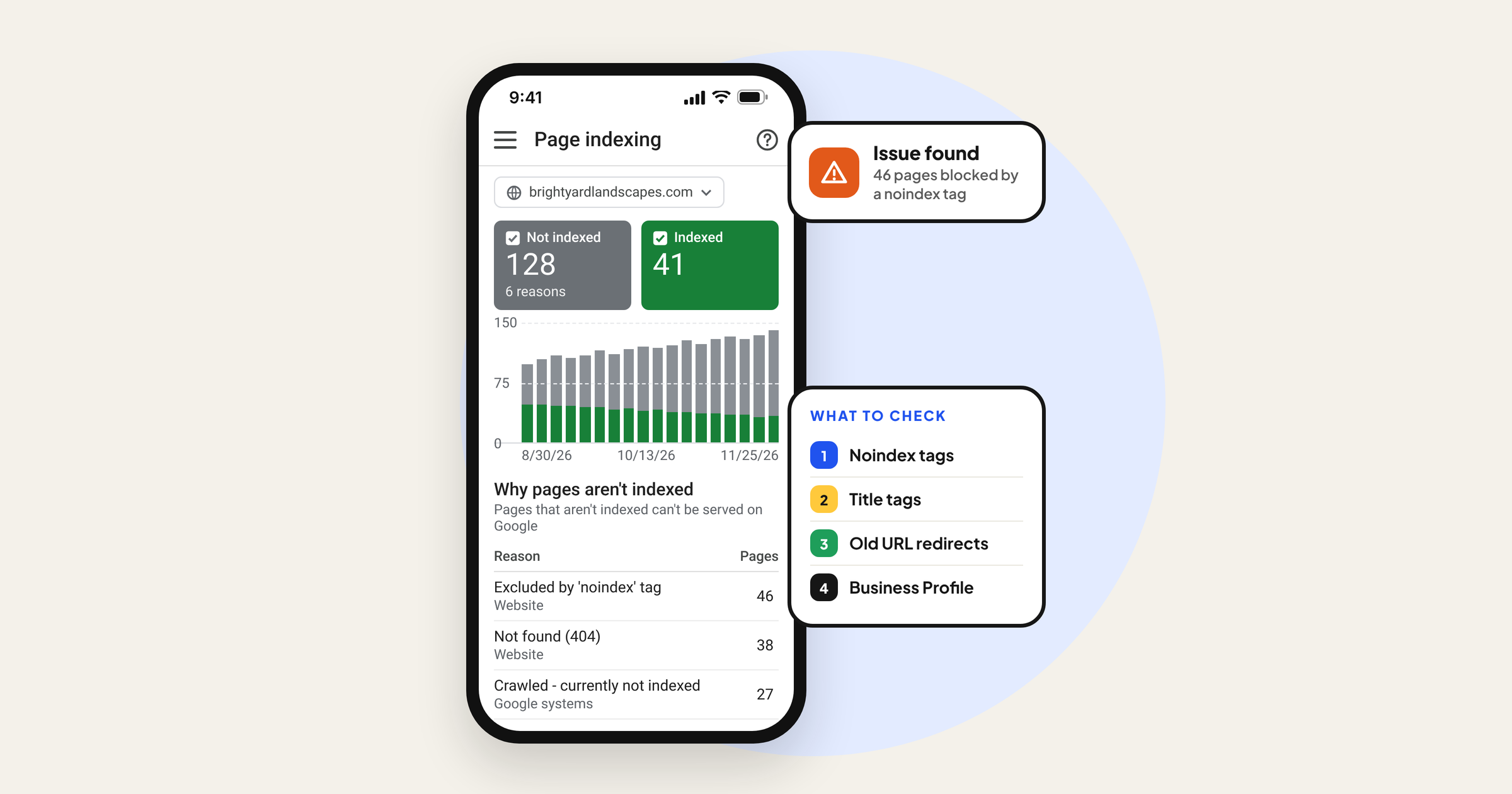
In Search Console, open Indexing, then Pages. Look at the reasons pages are not indexed and click each one:
- Excluded by 'noindex' tag. If any of your service pages or blog posts appear here, someone left a noindex setting on. In WordPress, check Settings, then Reading, and make sure "Discourage search engines from indexing this site" is unticked, then check your SEO plugin's settings for that page.
- Blocked by robots.txt. Visit yourdomain.com/robots.txt. A line reading "Disallow: /" blocks everything. Remember that robots.txt controls crawling, not indexing, so it is the wrong tool for hiding a page.
- Alternate page with proper canonical tag / Duplicate without user-selected canonical. Normal for filtered or tracking URLs, a problem if it lists your main pages.
- Not found (404). Normal for a few deleted pages, a red flag if it lists pages that used to get traffic.
- Crawled, currently not indexed. Google saw the page and chose not to index it. This is usually a quality or duplication signal, not a technical bug, so improve the page rather than resubmitting it repeatedly.
The redesign mistake
The single most expensive technical mistake we see is a redesign or platform move (for example WordPress to Shopify, Wix to Webflow) that changes every URL without redirects. Google treats the new URLs as brand-new pages, and the old ones it trusted now return 404s. Before any rebuild, export every URL from your old sitemap and from Search Console's top pages, map each to its new URL, and set up 301 redirects on launch day. Our guide to website development for small businesses covers the full launch checklist.
Smaller technical issues worth fixing
- Both http and https, or www and non-www, loading separately instead of redirecting to one version.
- No XML sitemap, or a sitemap full of redirected and deleted URLs.
- Important content only inside images or sliders, with no real text Google can read.
- Internal links pointing to old URLs that now redirect, creating chains.
How do slow and clumsy mobile pages hurt SEO?
Slow and clumsy mobile pages hurt SEO because Google uses the mobile version of your site for indexing and ranking, and page experience signals such as Core Web Vitals form part of how it evaluates pages. More importantly, slow pages lose customers before they read a word, so even good rankings convert poorly.
Google finished moving all sites to mobile-first indexing in 2024, so whatever your site looks like on a phone is what Google judges. Core Web Vitals now measure three things: loading (Largest Contentful Paint), responsiveness (Interaction to Next Paint, which replaced First Input Delay in March 2024) and visual stability (Cumulative Layout Shift). Google's Core Web Vitals documentation sets "good" thresholds of LCP within 2.5 seconds, INP under 200 milliseconds and CLS under 0.1.
Speed is rarely the reason a strong page ranks on page five, so do not obsess over a perfect score. Fix it because it is costing you leads.
The usual culprits on small business sites
- Hero images uploaded straight from a camera at 5MB or more. Resize to the display width and serve WebP or AVIF.
- Five chat widgets, review widgets, heatmaps and pop-up tools all loading on every page. Remove anything you have not looked at in three months.
- Page builder themes loading dozens of scripts for features you do not use.
- Fonts loaded from several sources. Two font families are usually enough.
- Pop-ups that cover the whole screen on mobile the moment the page loads.
How to check: open Search Console, then Experience, then Core Web Vitals, and look at the mobile report first. For a specific page, run it through PageSpeed Insights and read the "Diagnose performance issues" section, which names the exact files slowing you down.
What local SEO mistakes keep small businesses out of the map pack?
The local SEO mistakes that keep businesses out of the map pack are choosing the wrong primary category on Google Business Profile, inconsistent name, address and phone details across the web, too few recent reviews, no replies to reviews, and a website that never mentions the areas you serve.
For any business that serves customers in a specific area, the Business Profile often drives more calls than the website itself. Google says local results are based mainly on relevance, distance and prominence, so the things you control are relevance and prominence.
Fixes in order of impact
- Primary category. Pick the category that matches your main money service, not your broadest description. A "Dentist" who earns most revenue from implants may still keep Dentist as primary but should add relevant secondary categories. Look at the categories of the businesses that rank above you for your main term.
- Accurate details. Your business name should match your real-world signage. Adding keywords to the name (for example "Smith Plumbing Best Emergency Plumber Austin") breaks Google Business Profile guidelines and can get the profile suspended.
- Services and descriptions. Fill in the services list with the same wording customers use, and write a description that explains what you do and where.
- Reviews. Ask every happy customer, every week, with a direct review link. Reply to every review, including negative ones, calmly and specifically. Never offer discounts in exchange for reviews or post fake ones.
- Photos and updates. Add real photos of your team, vehicles, premises and work. Profiles that look active build trust with searchers.
- Website match. Make sure your website shows the same name, address and phone number, has a contact page with your service areas, and links the profile to the most relevant page, not always the homepage.
For businesses in health-related fields, keep review requests and replies free of patient health details. A reply like "Glad your treatment went well, Sarah" can reveal more than it should, so keep responses general.
Which link building mistakes can get a small business site penalised?
The link building mistakes that can get a site penalised are buying links, joining link exchange schemes, using private blog networks, and mass-submitting to low-quality directories. Google's spam policies treat links meant to manipulate rankings as link spam, and a manual action can remove pages from results until you clean it up.
Every small business owner gets the email: "We will build 500 high-DA backlinks for $99." Those links come from sites built to sell links, and Google has spent years learning to ignore or penalise them. At best you waste money. At worst you get a manual action, which shows up in Search Console under Security and Manual actions, then Manual actions.
Links that actually help a small business
- Local relationships: suppliers, manufacturers you are a certified installer for, trade associations, chambers of commerce, and local sponsorships that list sponsors on their sites.
- Real press: a local news story about a project, a community event, or an expert quote you gave a journalist.
- Useful resources: a genuinely helpful guide, calculator or checklist that other sites want to reference.
- Partners: businesses that refer work to you and you to them, linking where it makes sense for their visitors.
The internal link mistake
The other link mistake is ignoring the links you fully control. Many small business blogs have posts that never link to the service page they relate to, so neither visitors nor Google can follow the path from advice to booking. Every blog post should link to its most relevant service page, and service pages should link to the two or three guides that answer common objections. Use descriptive anchor text such as "gutter guard installation" rather than "click here".
Why is tracking rankings instead of leads a hidden SEO mistake?
Tracking rankings instead of leads is a hidden SEO mistake because rankings for vanity keywords can rise while enquiries stay flat. Without call, form and booking tracking, you cannot see which pages bring customers, so you keep optimising pages that look good in reports and ignore the ones that pay.
We regularly see owners celebrating a "number one ranking" for their business name or for a keyword with ten searches a year, while their actual service pages lose ground. The fix is to measure the chain from search to revenue.
The minimum measurement setup
- Search Console verified as a Domain property, so you see every version of your site. Check the Performance report monthly for queries, pages, clicks, impressions, CTR and position.
- Google Analytics 4 with key events set up for form submissions, phone link clicks, booking confirmations and purchases. Without key events, GA4 shows traffic but not results.
- Call tracking if phone calls are a big share of your leads, with a dynamic number on the site so you can see which channel drove each call.
- A simple monthly sheet: organic sessions, organic leads, leads by landing page, and closed revenue from organic leads if your CRM can tell you.
Do not forget AI search visibility
Search now includes AI Overviews and AI Mode, and Google added generative AI performance insights to Search Console in 2026. According to Google's announcement, these show how often your URLs appear in Google's generative AI features, and Google says they reached all websites worldwide by the end of August 2026. Check which of your pages appear there. Pages that open each section with a clear, self-contained answer tend to be easier for AI features to quote, which is one more reason to write plainly.
What does fixing common SEO mistakes look like on a real small business site?
Fixing common SEO mistakes on a typical small business site usually means one to two weeks of cleanup followed by steady improvement over two to four months. The example below is illustrative, built from patterns we see often, to show how small fixes compound into more enquiries without any extra ad spend.
Picture a family-run landscaping company in a mid-sized US city. Its site has a homepage, one "Services" page listing eight services, a contact page and a blog with twelve generic posts. Search Console shows about 4,000 impressions a month, an average position around 22, and roughly 60 clicks. About 4 percent of organic visitors fill in the quote form, so the site produces two or three organic leads a month.
What the audit finds
- The Services page is targeting eight services at once, and none of them ranks above page two.
- Six of the twelve blog posts target nearly identical "spring lawn care tips" phrases and split impressions.
- The homepage title is "Home".
- Two important pages carry a noindex tag left from the original build.
- The Business Profile primary category is "Landscape designer" although most revenue comes from hardscaping and patios.
- No form or phone click tracking exists in GA4.
What changes and the illustrative maths
The team creates four dedicated service pages for the highest-margin work, merges the six overlapping blog posts into one strong guide with redirects, rewrites ten titles and descriptions, removes the noindex tags, adjusts the profile categories, and sets up key events.
Suppose that over three months, impressions rise to 7,000 as the new pages get indexed, and the average CTR rises from 1.5 percent to 3 percent thanks to better titles and higher positions. Monthly clicks go from about 60 to about 210. At the same 4 percent conversion rate, that is roughly eight leads instead of two or three. If the business closes one in four quotes and an average patio job is worth $6,000, that is about two extra jobs, or around $12,000 in monthly revenue the site was missing. These figures are an illustration of how the maths works, not a promise; your numbers depend on your market, competition and how quickly you act.
How can you audit your own site for SEO mistakes this week?
You can audit your own site for the most common SEO mistakes in about three hours using only free tools: Google Search Console, PageSpeed Insights, your Business Profile dashboard and a private browser window. Work through the checklist below in order, because the first items can block everything that comes after.
| Check | Tool | What a problem looks like | First fix |
|---|---|---|---|
| Important pages indexed | Search Console, Pages | Service pages under noindex or robots.txt | Remove the block, request indexing |
| Manual actions | Search Console, Manual actions | Any listed action | Follow the stated cleanup steps |
| One page per main service | Your site navigation | One page lists many services | Build focused service pages |
| Titles and descriptions | Search Console, Pages tab with CTR | High impressions, low CTR | Rewrite the snippet |
| Duplicate targeting | Search Console, filter by query | Several URLs share one query | Merge and redirect |
| Mobile speed | Core Web Vitals report | Poor or needs improvement URLs | Compress images, cut scripts |
| Business Profile | Profile dashboard | Wrong primary category, few recent reviews | Fix category, start review requests |
| Backlink quality | Search Console, Links | Many links from unrelated foreign sites | Stop paid links, disavow only if a manual action exists |
| Lead tracking | GA4, Key events | No form or call events | Add key events |
| Old URLs after redesign | Search Console, 404 list | Former top pages returning 404 | Add 301 redirects |
Write down every problem you find with the page URL and the date. That list becomes your plan and your before-and-after record.
What is a realistic 30, 60 and 90 day plan to fix SEO mistakes?
A realistic plan fixes blocking problems in the first 30 days, rebuilds key pages and the Business Profile by day 60, and moves into content and authority building by day 90. Spreading the work this way stops you from changing everything at once, which makes it impossible to tell what helped.
Days 1 to 30: remove the blockers
- Fix any noindex, robots.txt, canonical or redirect problems found in the audit.
- Rewrite the titles and descriptions of your ten highest-impression pages.
- Correct your Business Profile categories, services and details, and start a weekly review request routine.
- Set up GA4 key events and, if needed, call tracking, so you have a clean baseline.
Days 31 to 60: rebuild what matters
- Create or rebuild one dedicated page for each of your top three to five money services.
- Merge overlapping blog posts and redirect the old URLs.
- Compress images and remove unused scripts on your most visited pages.
- Add internal links from every relevant blog post to the matching service page.
Days 61 to 90: build authority and keep score
- Publish one or two genuinely useful guides that answer questions customers ask before buying.
- Contact three to five suppliers, associations or partners about legitimate listings or features.
- Compare Search Console clicks, CTR and GA4 leads with your baseline month, page by page.
- Decide what worked, then repeat it for the next set of services or locations.
SEO compounds slowly, and the first sixty days often look quiet in the numbers. Many businesses pair this period with focused paid search for their most urgent services, which our guide to Google Ads for small businesses explains, so leads keep coming while organic rankings build.
Want a second pair of eyes on your SEO?
A professional SEO audit helps when you have fixed the obvious issues but rankings and leads still have not moved, or when you are planning a redesign and cannot afford to lose existing traffic. An experienced team can spot patterns across Search Console, your content and your local presence much faster than trial and error.
At Digilabss we start every engagement by understanding your brand, your customers and what makes them choose you, because the right keywords and pages come from customer psychology, not from a tool. Then we fix what is blocking you, build the pages that should be ranking, and connect it all to real enquiries. You can see how we approach it on our SEO services page, or book a free SEO audit and we will show you the mistakes costing you the most, in order of what to fix first.
Frequently asked questions
What is the biggest SEO mistake a small business can make?
The biggest SEO mistake is accidentally blocking Google from your pages, usually with a noindex tag or robots.txt rule left on after a build or redesign. Nothing else matters if your pages cannot be indexed, so check the Page indexing report in Search Console first. After that, the most expensive mistake is relaunching a site without 301 redirects from old URLs.
Can SEO mistakes get my website penalized by Google?
Most SEO mistakes do not cause a penalty; they simply make your pages less useful or harder to find, so they rank lower. Penalties, called manual actions, usually come from breaking Google's spam policies, for example buying links, publishing mass-produced doorway pages or hiding text. You can see any manual action in Search Console under Security and Manual actions.
How do I know if my website has SEO mistakes?
Start with Google Search Console, which is free. The Page indexing report shows pages Google cannot or will not index, the Performance report shows pages with impressions but few clicks, and the Core Web Vitals report flags slow mobile pages. Then compare your main service pages with the top three results for your target keyword.
Is using AI to write blog posts an SEO mistake?
Using AI is not a mistake by itself, but publishing unreviewed, generic AI content at scale is. Google's guidance focuses on whether content is helpful and original, not how it was produced, and its spam policies target scaled content made mainly to rank. Use AI to draft if it helps, then add your own experience, examples, prices and steps before publishing.
How long does it take to recover from common SEO mistakes?
Technical fixes such as removing a noindex tag can show results within days to a few weeks once Google recrawls the page. Content and page structure improvements usually take two to four months to show clearly, and recovering from a core update often takes until a later update. Track clicks and leads by page so you can see progress early.
Should I fix SEO mistakes myself or hire an SEO agency?
You can fix many common SEO mistakes yourself, especially titles, Business Profile details, indexing blocks and service pages, using the checklist in this guide. Consider an agency when rankings stay flat after the basics, when you are planning a redesign or migration, or when you do not have time to keep content and reviews moving every month.