Website Development for Small Businesses: The Complete Guide

In this article
- What website development for a small business actually includes
- Step 1: Decide the one job your website has to do
- Step 2: Choose a platform you can actually run
- Step 3: Plan your pages around how customers buy
- Step 4: Write copy that turns visitors into customers
- Step 5: Design for the phone first
- Step 6: Make it fast and pass Core Web Vitals
- Step 7: Set up tracking before you launch, not after
- Step 8: Build in your SEO foundations from day one
- Step 9: Accessibility, security and trust
- Step 10: Launch with a checklist
- After launch: maintenance and continuous improvement
- How much does a small business website cost, and how long does it take?
- Common website mistakes we see in small business accounts
- DIY, freelancer or agency?
- Get a website that is built to sell, not just to look good
You finally launch ads. The clicks start coming in, you can see them in the dashboard, and then nothing happens. No calls. No form fills. You open your own website on your phone to check, and it takes forever to load, the menu covers half the screen, and the "Contact us" button is somewhere near the bottom of a very long page. You realize the ads were never the problem. The website was.
That moment is why this guide exists. Website development for small business owners is not about getting a pretty homepage online. It is about building a site that does one job very well: turn the visitors you earn from Google, Meta and word of mouth into calls, bookings, leads and sales. To do that, you need to decide what the site must achieve, pick a platform you can actually manage, plan pages around how your customers buy, make it fast on mobile, track every conversion and launch it without breaking what already works.
This guide walks through that process in order, from the view of a performance marketer who spends most days looking at what happens after someone clicks an ad. It is written for US and Canadian small businesses in late 2026, whether you are building your first site, replacing an old one or hiring someone to do it for you. If you also want to understand how to get found in search once the site is live, our SEO for small business websites guide is the companion to this one.
What website development for a small business actually includes
When people hear "website development" they usually picture design and code. For a small business, that is only the middle of the job. A complete website project covers:
- Strategy. Who the site is for, what action you want them to take and how you will measure it.
- Structure and content. The pages you need, what goes on each one and the words that persuade people to act.
- Design. Layout, branding and the mobile experience, which is where most of your visitors will see you.
- Build. The platform, templates or code, and integrations like booking tools, payments and your CRM.
- Performance. Page speed, image handling, hosting and Core Web Vitals.
- Tracking. Analytics, ad conversion tracking and call tracking, set up and tested before launch.
- Search foundations. Titles, headings, internal links, structured data and redirects from any old site.
- Trust and compliance basics. Security, privacy policy, consent where required and accessibility.
- Maintenance. Updates, backups, uptime checks and ongoing improvements.
Skip any of these and you usually pay for it later, often through ad spend that never turns into revenue. The rest of this guide takes them one step at a time.
Step 1: Decide the one job your website has to do
Before anyone opens a design tool, write down the single most valuable action a visitor can take. Everything else on the site supports that action. A plumber wants phone calls. A skincare brand wants orders. A B2B consultancy wants qualified discovery calls. When a site pushes five actions with equal weight, people often take none of them.
Here is how that plays out across common small business types:
| Business type | Main conversion | Pages that matter most |
|---|---|---|
| Local home services (plumbing, HVAC, roofing) | Phone calls and quote requests | Individual service pages, service area page, reviews, contact |
| Dental, medical or aesthetic clinic | Appointment requests | Treatment pages, team and credentials, pricing or financing, booking |
| D2C e-commerce (fashion, supplements, beauty) | Purchases | Product pages, collection pages, shipping and returns, reviews |
| Restaurant or food brand | Orders and reservations | Menu, online ordering or booking, location and hours |
| B2B and professional services | Qualified leads and booked calls | Service pages, case studies, about, contact or booking |
| SaaS or mobile app | Trials, demos or installs | Product and feature pages, pricing, integrations, sign up |
Once you know the main conversion, decide your secondary one. For most service businesses that is a lighter commitment, such as a short quote form for people who do not want to call. For e-commerce it might be an email signup. Then write down the number you will judge the site by, for example "booked appointments from the website per month", so you can tell later whether the site is working.
Step 2: Choose a platform you can actually run
The best platform is the one that fits your business model and that you or your team can update without calling a developer for every small change. Here is how the common options compare for small businesses:
| Platform | Best for | Strengths | Watch out for |
|---|---|---|---|
| WordPress (self-hosted) | Service businesses, content-heavy sites, local SEO | Huge flexibility, full ownership, strong SEO control | Plugin bloat, security updates, needs good hosting and regular maintenance |
| Shopify | D2C e-commerce brands | Checkout, payments, inventory and apps built in, reliable hosting | Monthly plan plus app fees add up, less flexible for complex content |
| Webflow | Design-led brands, B2B, SaaS marketing sites | Clean code, visual control, good performance | Learning curve, plan costs rise with features and traffic |
| Squarespace or Wix | Very small sites, owner-managed, tight budgets | Fast to launch, hosting and security handled | Less control over speed and advanced tracking, harder to scale |
| Custom build (for example a framework plus a headless CMS) | Brands with specific needs or high traffic | Very fast pages, total flexibility | Higher build cost, you depend on a developer for changes |
Ownership matters more than the platform
Whatever you choose, make sure your business owns the important accounts: the domain registrar, hosting or platform account, Google Analytics, Google Search Console, Google Business Profile and Meta business assets. Add your developer or agency as a user, never the other way round. One of the most painful situations we see is a business owner who cannot change their own website because a freelancer who disappeared owns the hosting login.
Questions to ask before you commit
- Can my team edit text and images and add a new page without code?
- Does it support the booking, payment or CRM tools we already use?
- Can we add Google and Meta tracking, including server-side options, without hacks?
- What will it cost per month once we add the apps or plugins we need?
- If we leave, can we export our content?
Step 3: Plan your pages around how customers buy
A small business site does not need dozens of pages to start, but it does need the right ones. Most sites need:
- Home page. Says what you do, who you do it for, where you work and what to do next, all visible without scrolling on a phone.
- One page per core service or product category. A single "Services" page listing everything rarely ranks or converts well. A dedicated page for "drain cleaning" or "teeth whitening" can match exactly what someone searched for or clicked on.
- About page. Real people, real credentials, why you started. This matters more than most owners think, especially in health, finance and home services.
- Proof. Reviews, project photos, before and after work where permitted, and case studies with genuine details.
- Contact or booking page. Phone number, short form, and a map and hours for local businesses.
- FAQ or resources. Answers to the questions your team hears every week.
If you serve several cities, be careful with location pages. A page for each town with the same text and the city name swapped is what Google calls a doorway page, and it can hurt the whole site. Only create a location page when you have something genuinely specific to say, such as a real office, local projects, local team members or different services in that area.
Keep the structure simple
Use short, readable URLs like /services/ac-repair instead of /page?id=123. Keep your main navigation to the five to seven items people actually need. Link related pages to each other, for example from a service page to the matching FAQ and case study, so visitors and search engines can find their way around.
Step 4: Write copy that turns visitors into customers
Design gets the attention, but words do the selling. Most small business sites we audit talk about the company ("we are passionate about quality") instead of the customer's problem. Write for the person who just landed and is deciding in a few seconds whether to stay.
The first screen on mobile
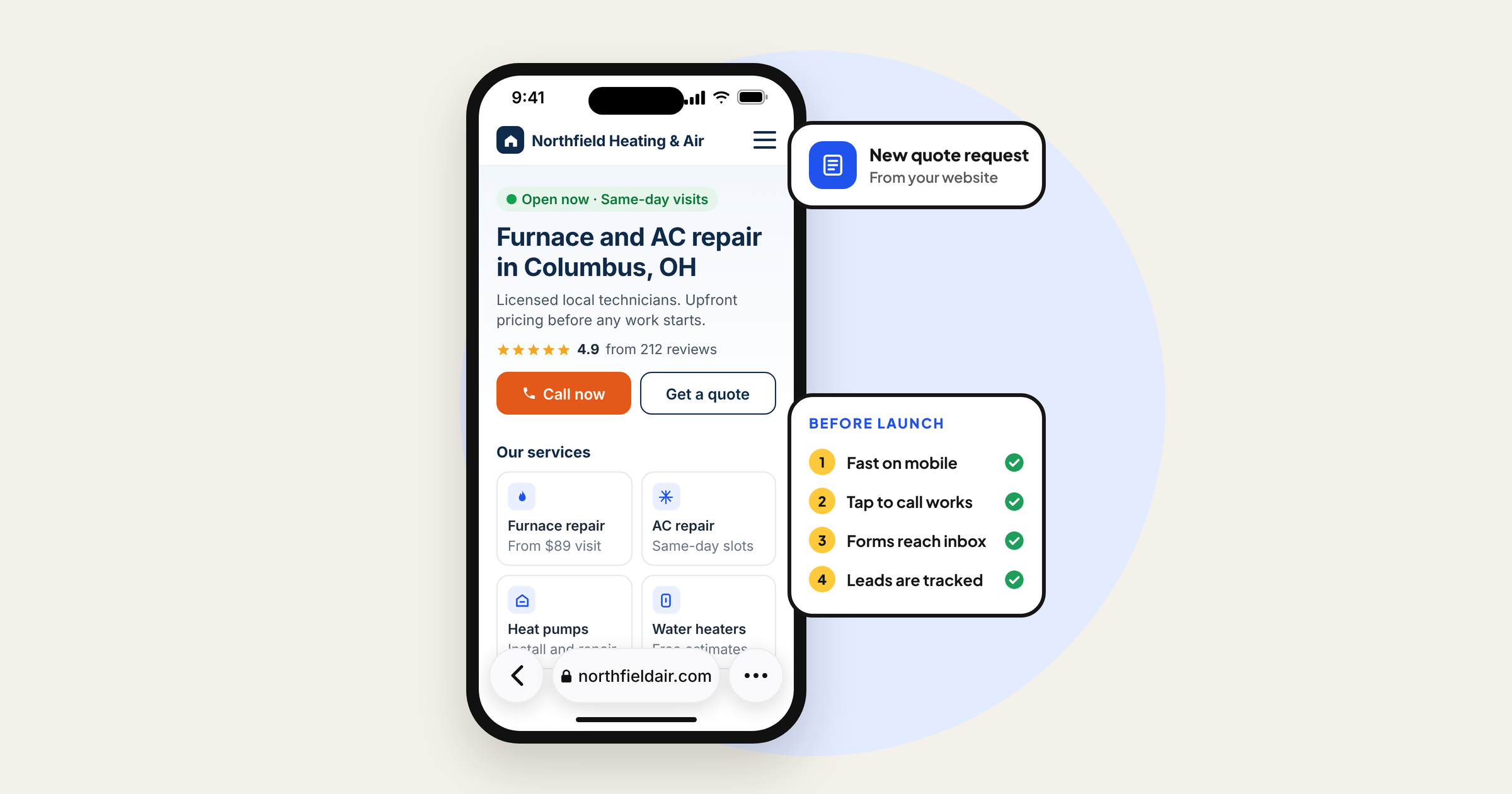
Without scrolling, a visitor should be able to answer four questions: What is this? Is it for me? Can I trust it? What do I do next? That usually means a clear headline naming the service and the location or audience, one supporting line, a trust signal such as a rating or years in business, and a single obvious button.
Match the message to your ads
If your Google ad says "Same day water heater repair in Austin", the page it sends people to should say the same thing at the top. If your Meta ad shows a specific product and offer, the landing page should show that product and that offer, not your homepage. Mismatched pages are one of the main reasons ads get clicks but no conversions, a problem we break down in why Meta ads get clicks but no sales. Google Ads also rates landing page experience as part of Quality Score, which affects what you pay per click.
Answer objections before they become reasons to leave
List the five questions or worries customers raise before buying: price, timing, whether you serve their area, what happens if something goes wrong, how long results take. Answer each one on the relevant page in plain language. Show pricing or a starting price where you can. Vague pages create doubt, and doubt costs you leads.
Step 5: Design for the phone first
For most small businesses, the majority of visitors arrive on a phone, especially from social ads and local searches. Google also uses the mobile version of your content for indexing and ranking, as explained in its mobile-first indexing documentation. So design the mobile layout first and then expand it for desktop, not the other way round.
- Tap to call. Make phone numbers clickable everywhere, and consider a sticky call or book button at the bottom of the screen for service businesses.
- Short forms. Ask only for what you need to follow up. Name, phone or email and one qualifying question is often enough. Every extra field loses people.
- Readable text. Body text that is comfortable to read without zooming, enough contrast and buttons large enough to tap with a thumb.
- No intrusive pop-ups. A full-screen pop-up the moment someone arrives from an ad is a fast way to lose them.
- Real photos. Photos of your team, your work and your products build more trust than generic stock images.
Step 6: Make it fast and pass Core Web Vitals
Speed is where many good-looking sites quietly fail. Every second of delay on mobile gives people another chance to hit the back button, and you have already paid for that click. Google measures real-user experience with three Core Web Vitals. According to web.dev, a page offers a good experience when, at the 75th percentile of visits:
- Largest Contentful Paint (LCP) is 2.5 seconds or less. This is how quickly the main content appears.
- Interaction to Next Paint (INP) is 200 milliseconds or less. This is how quickly the page responds when someone taps or clicks. INP replaced First Input Delay in March 2024.
- Cumulative Layout Shift (CLS) is 0.1 or less. This is how much the layout jumps around while loading.
How to check your site
- Run your key pages through PageSpeed Insights and look at the real-user (field) data section first, because that comes from real Chrome users. The lab score below it is useful for diagnosis but is not what users feel.
- In Google Search Console, open the Core Web Vitals report to see which groups of URLs are poor, need improvement or good on mobile and desktop.
- Open your site on an older, mid-range phone on a cellular connection. If it feels slow to you, it feels slow to your customers.
The fixes that usually matter most
- Images. Resize images to the size they are displayed, use modern formats like WebP or AVIF, and do not lazy-load the main hero image at the top of the page.
- Third-party scripts. Chat widgets, heatmaps, review badges and old tracking tags pile up. Remove anything nobody uses and load the rest after the main content.
- Plugins and apps. On WordPress and Shopify, each plugin or app can add code to every page. Audit them every few months.
- Fonts. Use one or two font families, limit weights and host them efficiently.
- Hosting. Cheap shared hosting is often the bottleneck on WordPress. Good managed hosting with a CDN usually pays for itself in conversions.
- Layout shifts. Set width and height on images and reserve space for banners so content does not jump.
Step 7: Set up tracking before you launch, not after
If you plan to run ads, this step decides whether your budget is spent intelligently or blindly. Google and Meta both optimize toward the conversions you send them. Send nothing, or send the wrong thing, and the algorithms optimize toward the wrong people. Our complete guides to Google Ads and Meta Ads for small businesses show how those platforms use this data once campaigns are live.
- Define your conversions. For example: form submitted, call from the website, booking completed, purchase. Decide which one is primary for each ad platform.
- Install the Google tag and set up Google Analytics 4. Mark your real conversions as key events. Ignore vanity events like scrolls when judging success.
- Set up Google Ads conversion tracking for the same actions, and turn on enhanced conversions if you collect email addresses or phone numbers, so Google can match more conversions.
- Install the Meta Pixel and the Conversions API. The Conversions API sends events from your server or platform, which makes tracking more reliable when browsers block cookies. Shopify, many WordPress plugins and many form tools offer built-in connections.
- Track calls. For service businesses, phone calls are often the main lead source. Use call tracking numbers, or at least track taps on click-to-call links.
- Fire conversions on real completions. Use a thank-you page or a confirmed submission event, not the button click, so failed or abandoned submissions are not counted as leads.
- Test everything. Use Google Tag Assistant and the Test events tool in Meta Events Manager, submit a real test lead, and confirm it appears in GA4, Google Ads and Meta.
Privacy and sensitive industries
Add a clear privacy policy and, where your audience or local laws require it, a consent banner connected to your tags. Several US states now have their own privacy laws, so check what applies to you with a qualified advisor; this guide is not legal advice. If you run a clinic, dental practice, aesthetics brand or supplement company, be extra careful about what your tracking sends. Never pass health details through URLs, form events or ad pixels. Meta also restricts some data sharing for websites it classifies as health and wellness, which can limit the events you can optimize for, so check Events Manager for notices before you build a campaign plan around purchase or lead events.
Step 8: Build in your SEO foundations from day one
It is far easier to build a site with good SEO foundations than to fix them later. During development, make sure that:
- Every page has a unique title tag and meta description written for humans, plus one clear H1.
- Service and product pages each focus on one main topic, using the words your customers actually search.
- Pages link to each other logically, and important pages are no more than a few clicks from the homepage.
- An XML sitemap is generated automatically and submitted in Google Search Console.
- Local businesses add LocalBusiness structured data with the same name, address and phone number as their Google Business Profile, and link the profile to the site.
- Images have descriptive alt text and file names.
Redesigning? Protect the rankings you already have
The most expensive website mistake we see is a redesign that wipes out existing search traffic. Before launch, export every URL that gets traffic or has links pointing to it, using Search Console and your analytics. Map each old URL to the most relevant new one and set up 301 redirects. Keep the content that ranks unless you are replacing it with something better. After launch, watch the Pages and Performance reports in Search Console for a few weeks. Our SEO for small business guide covers what to do next to grow that traffic.
Step 9: Accessibility, security and trust
An accessible website works for more customers, and in the US, businesses regularly receive demand letters and lawsuits over inaccessible websites. The commonly used benchmark is the Web Content Accessibility Guidelines (WCAG) at level AA. You do not need to become an expert, but your developer should cover the basics:
- Text and buttons have enough color contrast.
- Every image that carries meaning has alt text.
- Forms have proper labels and clear error messages.
- The site can be used with a keyboard, and focus is visible.
- Videos have captions.
Plug-in "overlay" widgets are not a substitute for fixing the actual code. For legal questions about your specific situation, speak to an attorney.
For security and trust, use HTTPS everywhere, keep the platform, themes and plugins updated, use strong passwords with two-factor login for every admin, and set up automatic daily backups stored off the server. Show the trust signals customers care about: real reviews, licenses or certifications, a physical address for local businesses and clear refund or guarantee terms.
Step 10: Launch with a checklist
Launch day is where small mistakes slip in, such as a forgotten "discourage search engines" setting or a form that sends emails to nobody. Use a checklist like this one:
| Check | How to confirm it |
|---|---|
| Site can be indexed | No noindex tags on live pages, robots.txt does not block the site, sitemap submitted in Search Console |
| Forms deliver | Submit every form and confirm the email or CRM entry arrives and the thank-you page loads |
| Conversions fire | Test lead appears in GA4, Google Ads and Meta Events Manager |
| Redirects work | Old URLs from your redirect map land on the right new pages |
| Mobile experience | Test on iPhone and Android: menu, buttons, forms, click-to-call |
| Speed | PageSpeed Insights on the homepage, top service page and top landing page |
| Security | HTTPS on every page, admin accounts use two-factor login, backups running |
| Business details | Phone, address, hours and links match your Google Business Profile |
After launch: maintenance and continuous improvement
A website is never finished. The sites that keep generating leads are the ones someone looks after. Build a simple monthly routine:
- Update the platform, themes and plugins, and check that backups ran.
- Review conversions by source in GA4 and your ad platforms. Which pages produce leads and which only produce visits?
- Check Search Console for indexing errors, Core Web Vitals issues and the search queries bringing people in.
- Watch session recordings or heatmaps on your main landing pages (Microsoft Clarity is free) to spot where people get stuck.
- Pick one improvement to test, such as a new headline, a shorter form or a clearer offer, and measure the result.
How much does a small business website cost, and how long does it take?
Cost depends far more on scope than on the platform. The main drivers are the number of unique page templates, how much custom design you need, whether you need e-commerce or booking integrations, who writes the copy and how much tracking and SEO setup is included. As a rough guide:
- DIY on a website builder. A monthly plan plus your own time. Fine to start, but most owners underestimate the hours, and copy, speed and tracking usually suffer.
- Template-based build by a freelancer or agency. A one-time project fee, typically in the low thousands of dollars for a small service site, more for e-commerce.
- Custom design and development. Higher project cost, usually justified when the site is your main sales channel or you spend heavily on ads.
On top of the build, budget for hosting or platform fees, domain renewal, paid plugins or apps and ongoing maintenance. A simple service business site often takes around four to eight weeks from kickoff to launch. Larger e-commerce or custom builds can take several months. The biggest cause of delay is usually content, meaning photos, copy and approvals, not the code.
Common website mistakes we see in small business accounts
- Sending all ad traffic to the homepage instead of a page that matches the ad.
- Contact forms that work in testing but send leads to an old inbox.
- Conversion tracking that fires on button clicks, so reported leads are far higher than real ones.
- Heavy sliders, autoplay videos and pop-ups that make mobile pages slow.
- A redesign launched without redirects, losing years of search traffic.
- The developer or a former employee owning the domain and hosting accounts.
- Copy that describes the company instead of the customer's problem and outcome.
DIY, freelancer or agency?
If you are just starting and have more time than budget, a website builder can get you online. If you need a reliable brochure site, a good freelancer with a clear scope works well. If the website is the engine behind your Google and Meta ads, look for a team that handles strategy, copy, build, speed and tracking together, because those pieces only perform when they are planned as one system. Whoever you choose, ask to see live sites they built, check them on your phone and ask how they set up conversion tracking.
Get a website that is built to sell, not just to look good
Website development for a small business pays off when the site is planned around one clear action, loads fast on a phone, matches the ads that send traffic to it and tracks every lead accurately. Get those right and every dollar you spend on Google, Meta or SEO works harder.
At Digilabss, we start every website development project by understanding your brand and how your customers decide to buy, before we design a single page. If your current site gets traffic but not enough calls, bookings or sales, book a free audit and we will show you where visitors are dropping off and what to fix first.
Frequently asked questions
How much does a small business website cost?
It depends mostly on scope: how many unique page templates you need, custom design, e-commerce or booking integrations, copywriting and tracking setup. A DIY builder costs a monthly plan plus your time. A template-based build by a freelancer or agency is usually a one-time fee in the low thousands of dollars for a small service site, and custom builds cost more. Also budget for hosting or platform fees, domain renewal, apps and maintenance.
How long does it take to build a small business website?
A simple service business site often takes around four to eight weeks from kickoff to launch. E-commerce and custom builds can take several months. Content, photos and approvals usually cause more delay than the development itself, so gather them early.
Is WordPress or Shopify better for a small business website?
Shopify is usually the better choice if selling products online is your main goal, because checkout, payments and inventory are built in. WordPress suits service businesses and content-heavy sites that need flexibility and strong SEO control, but it needs good hosting and regular updates.
Do I still need a website if I have a Google Business Profile and social media pages?
Yes, if you want to run ads or grow beyond referrals. Your profile and social pages are rented space with limited control. A website gives you dedicated landing pages for ads, full conversion tracking, pages that can rank for each service and a place you fully own.
How many pages does a small business website need?
Most small businesses can start with a home page, one page per core service or product category, an about page, a proof or reviews page, a contact or booking page and an FAQ. Add more pages when you have genuinely useful, specific content, not near-duplicate pages for every city.
What should I check before launching a new website?
Confirm the site can be indexed, every form delivers leads, conversions show up in GA4, Google Ads and Meta, old URLs redirect correctly, mobile menus and buttons work, key pages load fast, HTTPS and backups are in place, and your business details match your Google Business Profile.